Every content team eventually hits the same wall. The editorial calendar fills up, the team doesn’t, and somewhere between the keyword research tab and the fifth Google Doc draft, the whole operation starts to feel like it’s running on willpower alone.
This is not a productivity problem. It’s a systems problem. And systems problems have systems solutions.
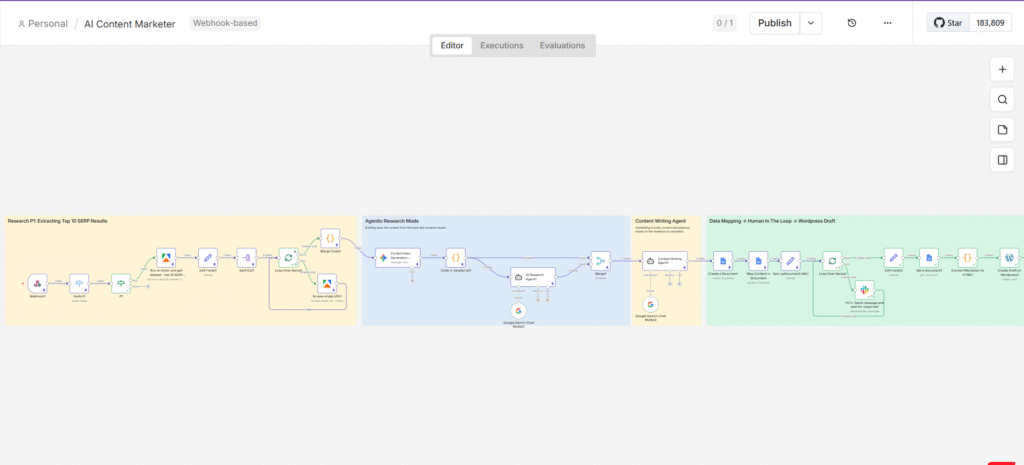
This article is a detailed breakdown of how I built an automated, AI-powered content pipeline using n8n – one that takes a target keyword, crawls what’s already ranking on Google, generates five research-backed article ideas, writes the drafts, routes them through human approval, and publishes them to WordPress as formatted drafts. No heroics. No all-nighters. Just a workflow that runs while you’re doing literally anything else.
The goal was never to remove the human from the content process. It was to remove the drudgery – the tab-switching, the copy-pasting, the repetitive formatting – and leave the human with the only job that actually requires one: editorial judgment.
The Problem With How Content Gets Made Today
Ask any content marketer to describe their week and you’ll hear a familiar sequence. It starts with a keyword. Then comes the SERP research – opening the top ten results, reading through each one, trying to mentally map what angles have been covered, what data has been cited, what format seems to resonate. That alone takes hours. Then comes the brief, then the draft, then the edits, then the SEO pass, then the CMS upload, then the formatting corrections because the paste-from-Google-Docs always breaks something.
Now multiply that by five articles per week. For a single writer, that’s essentially impossible without cutting corners somewhere – usually on research depth or originality, which are the two things that actually determine whether content ranks.
According to the Content Marketing Institute, 65% of B2B marketers cite producing content consistently as their top challenge. The bottleneck is almost never the writing itself. It’s everything that has to happen before the first sentence gets typed.
When I was running content for our startup – with one open content role, an SEO backlog growing faster than we could clear it, and zero budget to outsource – I stopped waiting for the headcount to arrive and started building the infrastructure instead.
The Architecture: Three Phases, One Pipeline
The workflow is built entirely on n8n, an open-source automation platform. It connects to Google Sheets (as the trigger layer), Apify (for web scraping), Google Gemini (as the AI backbone), Google Docs (as the review layer), Slack (for human-in-the-loop approval), and WordPress (as the publishing destination).
At a high level, the pipeline moves through three distinct phases:
- Phase 1 – Intelligence Gathering: Scrape and consolidate what’s actually ranking for the target keyword.
- Phase 2 – Agentic Research and Ideation: Use AI agents to generate content angles and deep-research each one.
- Phase 3 – Writing, Approval, and Publishing: Generate structured drafts, route them through human review, and push approved articles to WordPress.
Each phase feeds cleanly into the next. The output of the scraper becomes the input for the ideation agent. The output of the ideation agent becomes the input for the research agent. The research output becomes the brief for the writing agent. It’s a production line where every station is automated except the one that requires a human.
PHASE 1 – INTELLIGENCE GATHERING
Scraping What’s Actually Ranking
The Trigger: Google Sheets as the Control Panel
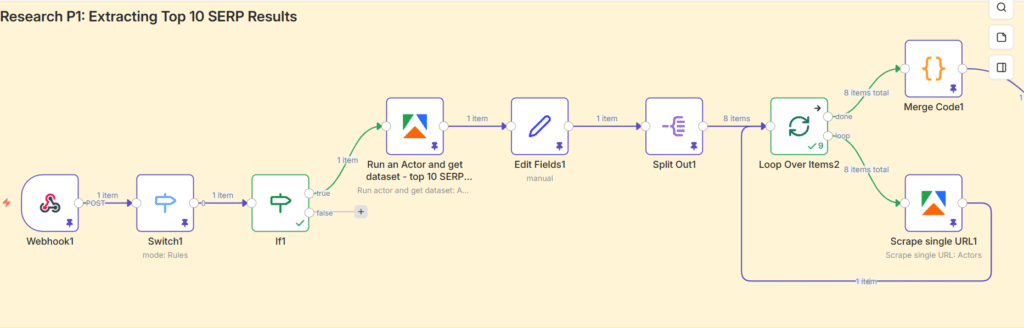
The workflow doesn’t start in n8n. It starts in a Google Sheet, which serves as the content calendar and the trigger mechanism simultaneously. A Google Apps Script running in the background watches the sheet for changes. When the status column for a row is updated to “In Progress,” it fires a POST request to an n8n webhook, passing along the target keyword.
The reason for using Google Sheets as the front-end, rather than a form or a direct n8n trigger, is intentional. It keeps the interface accessible to anyone on the team – no n8n knowledge required. A content manager can queue up articles, mark them as ready, and the pipeline handles everything downstream. The control panel stays simple. The complexity lives where it belongs: inside the workflow.
Routing Logic: The Switch and If Nodes
Not every change in the Google Sheet should trigger a content run. The Switch node acts as a routing filter, ensuring the workflow only responds to updates made in the specific status column. The If node then applies the condition: if the value equals “In Progress,” the workflow continues. If it doesn’t, execution stops there.
This kind of conditional routing is worth building into any production workflow. Without it, you end up with unintended triggers, duplicate runs, and a debug trail that’s hard to follow. Guard rails are not optional when the system is doing real work.
The SERP Scrape: Pulling 20+ Top-Ranking URLs via Apify
Once the keyword is confirmed, it’s passed to an Apify actor – specifically the Google Search Scraper. This actor queries Google for the target keyword and returns the top 20+ organic search results: URLs, titles, meta descriptions, and ranking positions.
The logic here is straightforward. If you want to produce content that ranks, you start by understanding what’s already ranking and why. Manual SERP research involves opening each result individually, skimming the content, noting the structure, identifying the data sources. The Apify scraper does the first part of that automatically – at scale, in seconds, without a single browser tab.
A Set node then extracts only the organic results from the Apify response and consolidates them into a single clean array, stripping out ads, knowledge panels, and other SERP features that aren’t useful to the pipeline.
Deep Content Extraction: Scraping Every URL
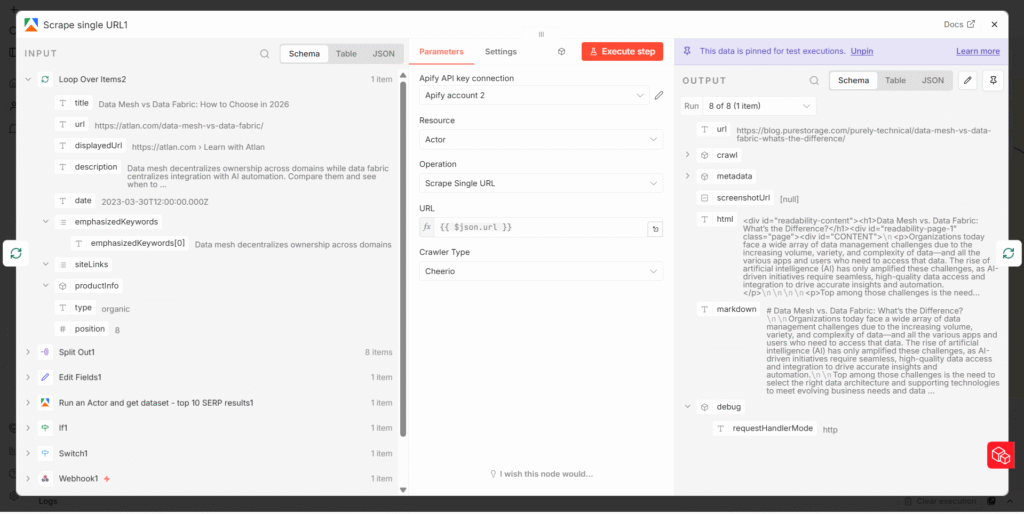
Having a list of ranking URLs is useful. Having the actual content from those URLs is far more useful. A second Apify actor – the Website Content Scraper – handles this. The organic URL array is split into individual items using a Split Out node, which allows n8n to process each URL separately inside a loop.
The loop runs the Website Content Scraper on each URL, extracting the full readable content from the page: headings, body text, any statistical data embedded in the copy. Each scraped result is then merged back together via a Merge Code node, which consolidates everything into a single large block of master content – a comprehensive picture of what the competitive landscape looks like for this keyword.
This master content block becomes the foundational input for every AI agent in Phase 2. The quality of the research here directly determines the quality of the output downstream. Garbage in, garbage out – it applies to automated pipelines as much as it does to human writers.
PHASE 2 – AGENTIC RESEARCH & IDEATION
From Raw Data to Structured Ideas
Content Idea Generation: Five Angles, Not One
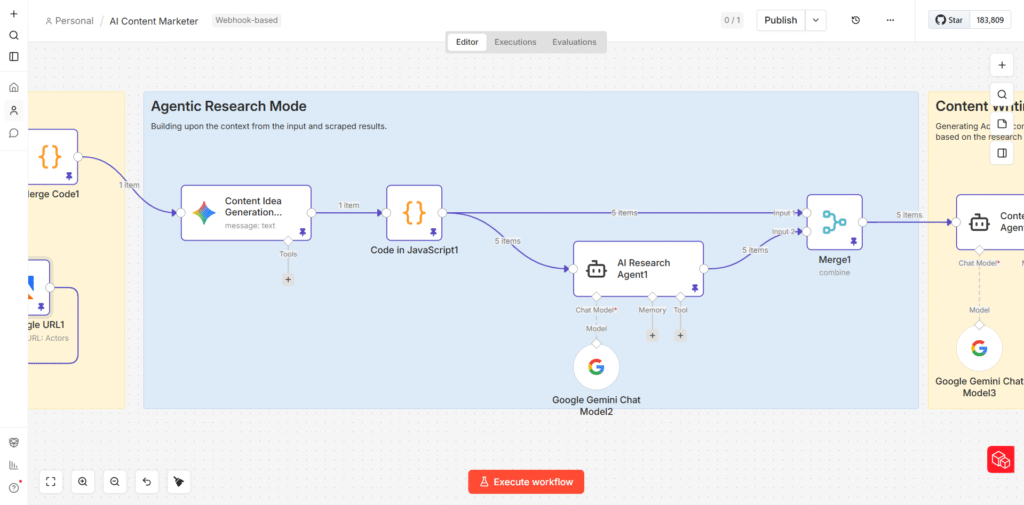
The first AI agent in the pipeline receives the full consolidated SERP content and is tasked with generating five distinct content ideas for the target keyword. For each idea, the agent outputs:
- A proposed article title
- A hook – the opening angle or tension point that makes the article worth reading
- A recommended content format (technical deep-dive, awareness piece, implementation guide, comparison article, etc.)
- A unique strategic angle that differentiates the article from what’s currently ranking
The reason for generating five ideas rather than one is deliberate. Different angles serve different stages of the buyer journey. One keyword might support a beginner-level awareness piece and a practitioner-level implementation guide simultaneously – and both can rank. Generating multiple options also gives the editorial team something to evaluate and choose from, rather than rubber-stamping a single AI suggestion.
The output from this agent is a single JSON array containing all five article ideas. A JavaScript Code node then breaks this array into five individual items, so that each article idea can be processed independently by the next agent in the pipeline.
The Research Agent: Depth Before Writing
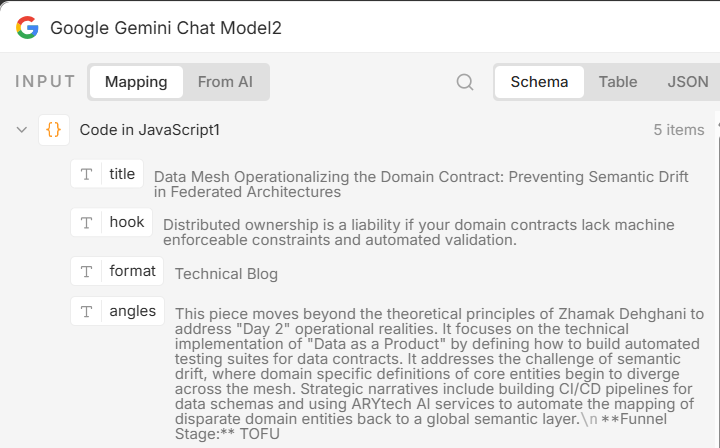
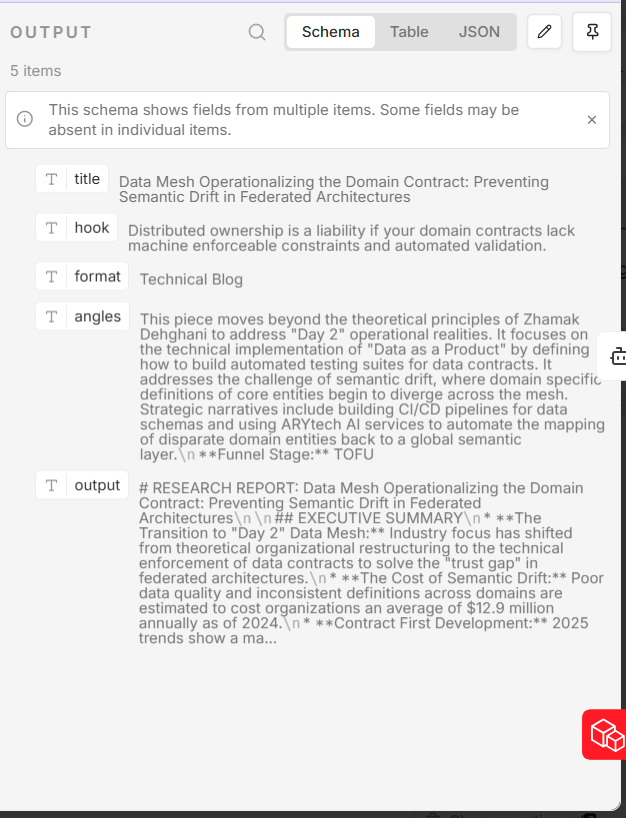
Each of the five article ideas is passed individually to an AI Research Agent powered by Google Gemini. This agent’s job is to enrich the article idea with substance before any writing begins. For each article, it surfaces:
- Relevant statistics and data points from credible sources
- Key industry insights and expert positions on the topic
- Supporting facts and figures that can be embedded naturally in the article
- Any emerging trends or recent developments worth referencing
The agent operates with web search capability enabled, meaning it doesn’t rely solely on the scraped content from Phase 1 – it can go further. This is the difference between an article that recycles what competitors have already said and one that brings new data to the conversation.
By the end of Phase 2, each of the five article ideas has its own research brief: a structured package of data, insights, and supporting evidence that the writing agent can draw from directly.
The Prompting Layer: Why This Is the Most Important Part of the Entire System
A common misconception about AI-powered workflows is that the automation is the hard part. It isn’t. The n8n logic – connecting nodes, routing data, managing loops – is learnable in a few weeks. What separates an AI pipeline that produces usable output from one that produces expensive noise is the quality of the prompts fed into each agent.
Prompt engineering is not about being clever with words. It’s about being precise about expectations. Every AI agent in this pipeline has a carefully constructed prompt built around six components:
| Prompt Element | What It Does | Example |
|---|---|---|
| Role Definition | Tells the AI who it is and what expertise to draw on | “You are a senior B2B content strategist with 10 years of SaaS experience…” |
| Context Injection | Provides all the background data the agent needs to reason from | “Here are the top 18 SERP results for this keyword: {scraped_content}” |
| Task Specification | Defines the exact deliverable – no ambiguity | “Generate 5 article titles, each with a unique angle, a hook, and a recommended format” |
| Output Format | Controls structure so downstream nodes can parse the response reliably | “Return your response as a JSON array with keys: title, hook, format, angle” |
| Constraints | Limits hallucination and keeps output within usable bounds | “Do not fabricate statistics. Only reference data present in the provided research.” |
| Examples (Few-Shot) | Shows the model what good output looks like | “Here is an example of an ideal title + hook combination: [example]” |
Think of a prompt the way a manager thinks about a brief to a new hire. Vague instructions produce vague work. The more specifically you define the role, the context, the task, the format, and the constraints – the less interpretation the agent has to do, and the more reliably it performs.
Prompt Example: The Content Idea Generation Agent
Here is a simplified version of the prompt structure used for the ideation agent in this pipeline. It illustrates how the six components come together in practice:
You are a senior B2B content strategist with expertise in SEO and audience-first content architecture. [ROLE] Below is the full content extracted from the top 18 organic search results for the keyword: {keyword}. Use this as your primary research input. [CONTEXT] {scraped_master_content} Your task is to generate exactly 5 distinct article ideas for this keyword. For each, produce: a title, a compelling hook, a recommended content format, and a unique strategic angle not already covered by the results above. [TASK] Return a valid JSON array only. No preamble, no commentary. Format: [{title, hook, format, angle}] [FORMAT + CONSTRAINT]
Notice what this prompt does not do: it does not say “write me some content ideas” and leave the model to interpret the rest. Every ambiguity is resolved before the agent runs. The output format is specified. The constraint against hallucination is explicit. The context is passed directly into the prompt so the model doesn’t have to guess.
PHASE 3 – WRITING, APPROVAL & PUBLISHING
From Research Brief to WordPress Draft
The Content Writing Agent: Rich Input, Structured Output
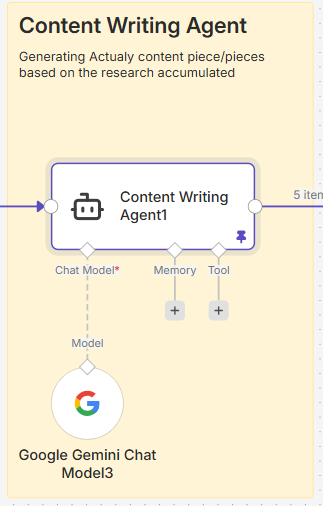
By the time data reaches the Content Writing Agent, each article has everything it needs to be written well. The agent receives a structured input package containing the target keyword, the specific article title, the recommended hook, the content format, the strategic angle, and the full research brief generated in Phase 2.
The prompt for the writing agent goes further than just passing this data. It specifies the article structure explicitly: where the H1 should sit, how many H2 sections to include, when to use bullet points versus prose paragraphs, and what types of elements to incorporate (data callouts, comparison sections, practical examples). It also defines the brand voice – direct, practitioner-level, data-referenced, no filler.
The richer the input to a writing agent, the less interpretive work it has to do – and the closer the first draft is to something publishable. A writing agent given a keyword and nothing else will produce generic content. A writing agent given a keyword, a hook, a unique angle, a format specification, and a deep research brief will produce something that actually competes.
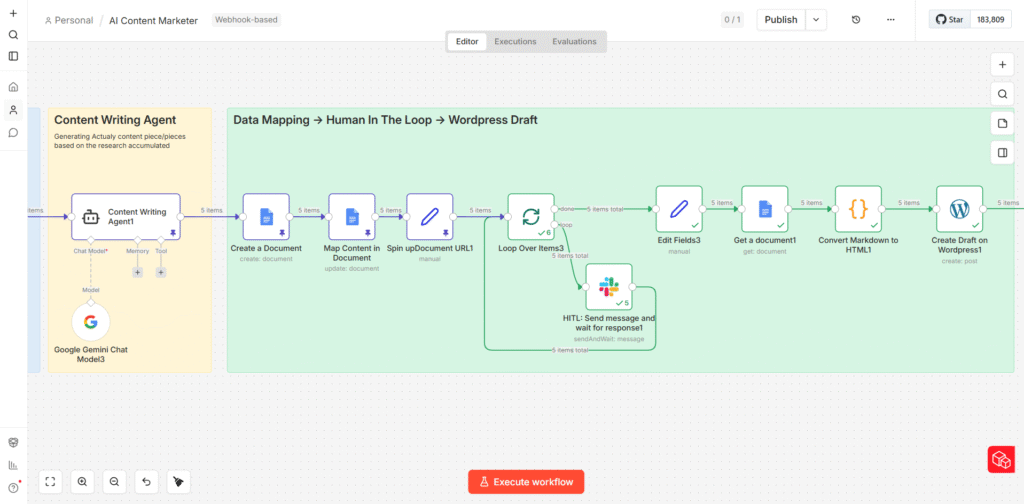
The agent runs five times – once per article idea – and each produces a full structured article in Markdown format.
Google Docs as the Staging Layer
Each of the five articles is automatically written into its own Google Doc via n8n’s Google Docs integration. The content is mapped cleanly – title as the document heading, body in full Markdown. This is the staging layer: a human-readable, shareable format that makes the review step simple for anyone on the team.
Using Google Docs here is a deliberate UX decision. It’s a format that every editor, marketer, and SEO specialist already knows how to navigate. The review doesn’t require anyone to log into n8n, understand the workflow, or interact with any technical tooling. They just open a Google Doc and read.
Human in the Loop: The Slack Approval Step
This is the part of the pipeline that some automation advocates skip – and shouldn’t. Once the articles are staged in Google Docs, n8n sends a Slack notification to the relevant channel. The message includes the article title, a link to the Google Doc, and a prompt asking for approval before publication proceeds.
The Human-in-the-Loop (HITL) step exists for a specific reason: AI writing agents, regardless of how well-prompted, can produce output that is technically correct but editorially wrong. The tone might be off. A statistic might be outdated. The angle might not fit the current editorial direction. These are judgment calls that require a human – not because the machine failed, but because editorial quality is a moving target that changes based on context a machine cannot always access.
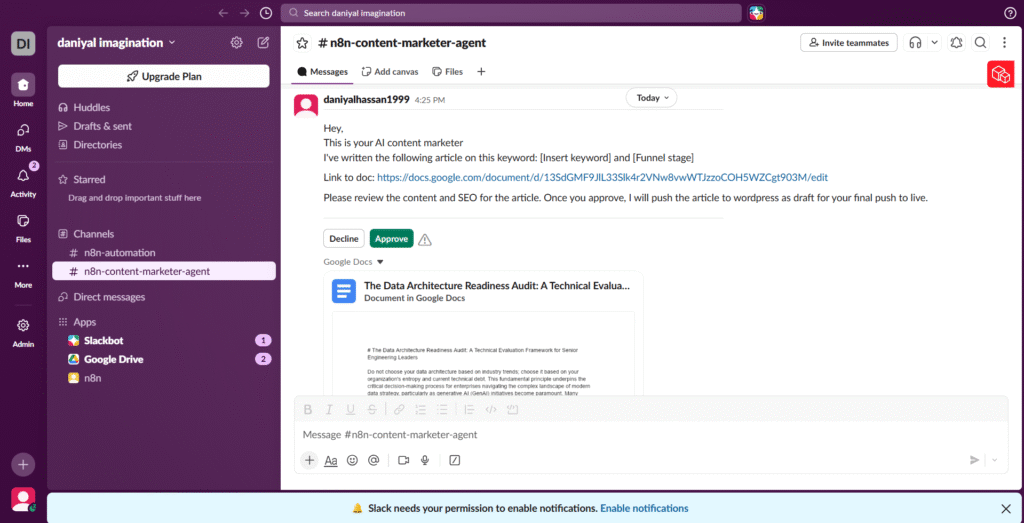
The workflow pauses at this node and waits for a response. A rejection loops back for revision. An approval triggers the final phase.
Human-in-the-loop is not a limitation of the system. It is the system working as designed. The goal was never full autonomy – it was maximum efficiency with maintained quality control.
Markdown to HTML: The Final Conversion
Once approved, the articles move through a Markdown-to-HTML conversion node. This step is important for a specific technical reason: WordPress renders HTML natively in its block editor, but Markdown does not translate cleanly if pasted directly. The conversion ensures that H1s become H1 tags, bullet points become unordered list items, bold text retains its weight, and the overall structure survives the transition to the CMS intact.
The converted HTML is then pushed directly to WordPress via its REST API as a draft post. The article arrives in WordPress fully formatted – headings, subheadings, bullets, paragraph breaks – ready for the SEO team to make final keyword placements, add internal links, attach featured images, and hit publish.
What This Actually Replaces
The table below compares the manual content production process to what the automated pipeline handles, across each major step:
| Task | Manual Process | Automated Pipeline |
|---|---|---|
| SERP Research | 2–3 hrs per topic, manually reviewing competitor pages | ~2 minutes via Apify scraping 20+ URLs automatically |
| Stat & Data Gathering | Scattered browser tabs, copy-paste, source verification | AI Research Agent queries and synthesizes data autonomously |
| Article Writing | 4–6 hrs per article including drafts and revisions | Content Writing Agent produces structured draft in minutes |
| Review & Approval | Email chains, Google Doc comments, version confusion | Slack HITL notification with direct approve/reject action |
| CMS Publishing | Manual copy-paste into WordPress, formatting fixes | Auto-converted HTML pushed as WordPress draft instantly |
| Output Volume | 1–2 articles per week per writer | 5 structured drafts per workflow run |
The numbers speak for themselves. What previously took a single content marketer the better part of a week to produce – one well-researched, properly formatted, SEO-aware article – the pipeline produces five of, in a fraction of the time, with consistent structure and a research foundation most manual processes wouldn’t have the bandwidth to build.
The Bigger Point
This pipeline is not a replacement for content marketers. It is what content marketing infrastructure should look like when it’s working properly. The bottleneck in most content operations is not talent – it’s the mechanical work that surrounds talent. Research, formatting, uploading, version tracking. These are tasks that consume hours and contribute nothing that a human specifically needed to contribute.
When those tasks are automated, the human’s time goes where it actually belongs: developing original ideas, refining voice, building subject matter expertise, and making the editorial calls that determine whether content builds an audience or disappears into the index.
The tools to build this are available, accessible, and increasingly easy to connect. n8n is free to self-host. Apify has a generous free tier. Google Gemini’s API costs are low at the volume most content teams operate at. The barrier to entry for this kind of infrastructure is not financial – it’s the willingness to treat content operations as a systems engineering problem.
If your content process still depends on heroic individual effort, you don’t have a content strategy. You have a content dependency. Build the system.

I am Daniyal Hassan, a Head of Growth turned GTM Engineer at a Software company , building systems that save Marketing & Sales teams hours, help 10x productivity, and build growing revenue pipelines.